Skills Are More Context-Efficient Than MCP
MCP servers can consume 55,000 tokens of Claude Code's context window before you type. Skills achieve the same automation at 3x lower cost. Token comparison for Playwright and a framework for choosing the right approach.

Greg Ruthenbeck
Table of Contents
You added five MCP servers to Claude Code. Playwright for browser testing, a search tool, a few others that seemed useful. Then you noticed your conversations hitting limits faster, context compaction kicking in earlier, the AI forgetting things you mentioned earlier. Your context window had shrunk by 55,000 tokens before you typed anything.
In this article we explore the key differences between Skills and MCPs, how they work, and how best to make use of them.
The Problem
MCP servers add tools to Claude's toolkit. Each tool comes with a definition: name, description, parameters, expected inputs and outputs. These definitions are written in natural language so the model understands when and how to use them.
The definitions load when the server connects and stay in context for the entire session. Every message you send, every response Claude generates, carries the weight of all tool definitions from all connected servers.
A single MCP server with 20 tools can consume 14,000 tokens. That overhead exists whether you use those tools or not.
Playwright: MCP vs Skill
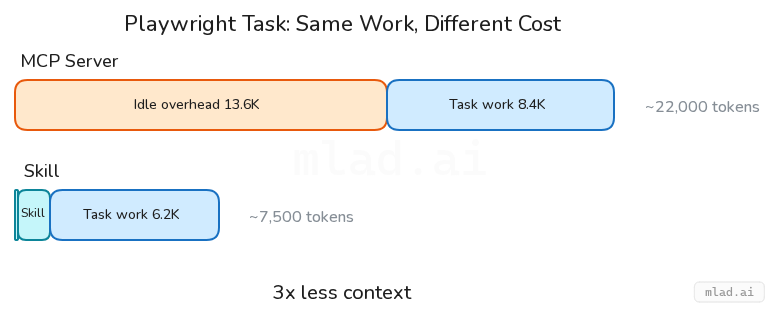
Playwright MCP provides 21 tools for browser automation. Navigate to URLs, click elements, fill forms, take screenshots, manage multiple pages. The tool definitions total 13,647 tokens.
The Playwright skill does the same work. It teaches Claude to write Playwright scripts using tools it already has: Bash to run commands, Write to create test files, Read to check results. The skill metadata sits in an index at around 100 tokens. When you invoke it, the full instructions load at roughly 1,200 tokens.
For a task like "verify the login page works and screenshot the result":
| Approach | Tokens consumed |
|---|---|
| MCP (idle) | 13,647 |
| MCP (after task) | ~22,000 |
| Skill (idle) | ~100 |
| Skill (after task) | ~7,500 |
In this example, the skill approach uses 3x less context to accomplish the same task.
Not an Outlier
The Playwright numbers are not unusual. Other developers measuring their setups find similar overhead.
Scott Spence documented his configuration: mcp-omnisearch at 14,114 tokens, five servers combined at 55,000 tokens. His initial context overhead hit 81,986 tokens before any conversation began. That is 41% of a 200K context window consumed by tool definitions alone.
Armin Ronacher measured the Sentry MCP at roughly 8,000 tokens. He called it "prohibitively expensive for typical conversations."
Spence experimented with optimization. He consolidated tools and trimmed descriptions, reducing mcp-omnisearch from 14,214 to 5,663 tokens. A 60% reduction. Still substantial overhead compared to skills.
What Makes Skills Different
Skills take a different approach to extending Claude's capabilities.
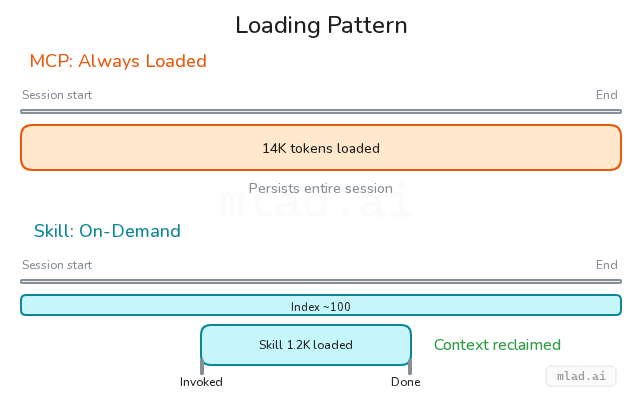
An MCP server says "here are new tools you can call." A skill says "here is how to accomplish something with the tools you already have."
Claude Code ships with Bash, Read, Write, Edit, Glob, Grep, and other built-in tools. A skill is a set of instructions for combining these tools to complete a specific task. No new tool definitions, no schema overhead.
The loading is progressive. The skill index holds a one-line summary of each available skill, around 100 tokens total for a dozen skills. When you invoke a skill, the full instructions load into context. When the task is done, that context can be reclaimed. MCP definitions persist for the entire session regardless of use.
When MCP is Worth the Overhead
MCP exists for good reasons. Some tasks require what skills cannot provide.
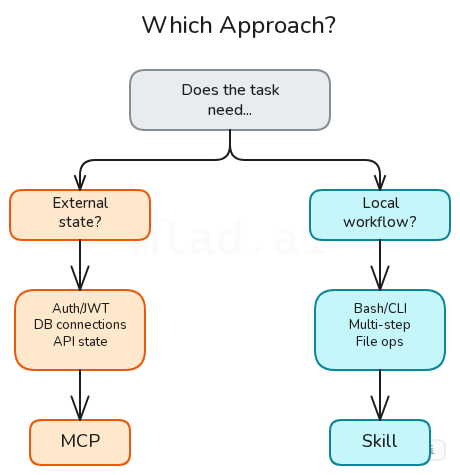
Authentication is the clearest case. JWT tokens, OAuth flows, API key rotation. An MCP server handles these transparently. A skill would need to store credentials somewhere Claude can access them, which creates security problems.
External state is another. A Ghost CMS MCP maintains a connection to your blog, knows the schema, validates payloads before sending. A Supabase MCP manages database sessions. These are stateful integrations, not procedures you can script.
Stable, well-documented APIs benefit from MCP's structure. If the service has typed endpoints that rarely change, the upfront cost of tool definitions pays off in reliable interactions.
The question is not MCP or skills. It is whether the capability requires persistent connection and external state, or whether it is a workflow Claude can execute with existing tools.
When Skills are the Better Choice
Skills excel at multi-step workflows that use local tools.
A commit skill runs git status, checks the diff, reviews recent commit messages for style, then creates a commit. Every step uses Bash. No external server needed.
A code review skill reads files, searches for patterns, applies a checklist, writes findings. All using Read, Grep, and Write. The instructions load when you ask for a review and disappear when done.
Custom automation is easier to maintain as a skill. The instructions live in a markdown file you control. Change them whenever you want. No server to redeploy, no protocol version to manage, no upstream changes breaking your workflow.
If you find yourself connecting an MCP server just to run shell commands or interact with local files, a skill will do the same work with a fraction of the context cost.
Getting Started
Claude can write skills. Describe what you want automated, and Claude will draft the instructions. This is not a workaround or a hack. Skills are markdown files that teach procedures. Claude is good at writing procedures.
At MLAD.ai, we built a Reddit API skill this way. We described the need: fetch posts from subreddits, calculate engagement metrics, filter by relevance, export to CSV. Claude wrote the SKILL.md: execution patterns, helper functions, rate-limit handling. 257 lines of instructions that run through Bash and Node, tools Claude already has. More details coming soon.
To start your own: pick a workflow you repeat. A deploy sequence, a test pattern, a code review checklist. Describe it to Claude. Ask for a skill file you can save to ~/.claude/skills/your-skill-name/SKILL.md.
For MCP servers you already have, consider which ones you need at startup. Tools like McPick enable servers selectively. Spence cut his context overhead from 41% to under 3% by loading only what each task required.
The goal is not eliminating MCP. It is matching the tool to the task and keeping context available for the work that matters.
Resources
Community (Reddit) discussions on context management and skills:
- Deep Dive: Anatomy of a Skill, its Tokenomics — Token costs and triggering behavior
- CLAUDE.md and Skills Experiment — Organizing instructions effectively
- MCP-CLI: Reducing Token Consumption — Experimental MCP optimization
- My Context Window Strategy — Practical token management
Some example Skills from our prompts collection:
- Skill Creator — A skill for writing skills
- MCP Builder — Building MCP servers
- Webapp Testing — Browser testing workflow
- Changelog Generator — Git log to changelog
- Meeting Insights Analyzer — Multi-step analysis