Securing Your Vibe-Coded App
Nearly half of AI-generated code contains security flaws. Five checks every vibe-coded app needs: server-side auth, secrets management, access control, XSS prevention, input validation. Platform fixes for MoltBot, Lovable, Codex, and Cursor.

Greg Ruthenbeck
Table of Contents
You typed what you wanted. AI wrote the code. Your app works. It handles users, stores data, connects to services. It looks professional. But "working" and "secure" are not the same thing.
The security research is catching up. Veracode benchmarked over 100 LLMs on 80 coding tasks and found that 45% of the generated code contained vulnerabilities from the OWASP Top 10, the industry's standard ranking of the most critical web application security risks. Separately, Wiz audited deployed vibe-coded applications and found hardcoded passwords visible in client-side JavaScript, API keys exposed in source code, and databases leaking personal information because access policies were never configured. One in five organizations using vibe-coding platforms were exposed to these risks.
These are not edge cases. They are the predictable result of AI that optimizes for working code, not safe code.
Five checks address the majority of these problems. They apply regardless of which tool you use.
Why AI Produces Insecure Code
AI coding tools are trained on code that works: tutorial code, Stack Overflow answers, quick scripts. Functional patterns, not defensive ones. Security is rarely the priority in this training data.
When you ask for "a login page," the AI gives you something that accepts credentials and lets users proceed. It probably does not hash passwords securely, limit failed attempts, expire sessions, or log authentication events. You did not ask for those things. The training data did not emphasize them. So they are absent.
This is fine for prototypes. The problem comes when prototypes become products.
Platforms are adding guardrails. Some scan before you publish, others block deploys with exposed secrets. These catch obvious mistakes but do not replace deliberate review.

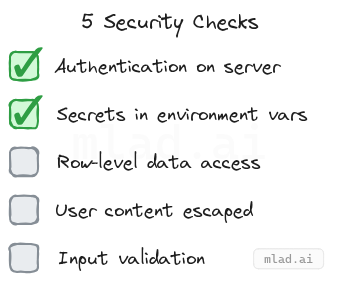
Five Things to Check
These five areas account for most security problems in AI-generated applications.
1. Authentication happens on the server
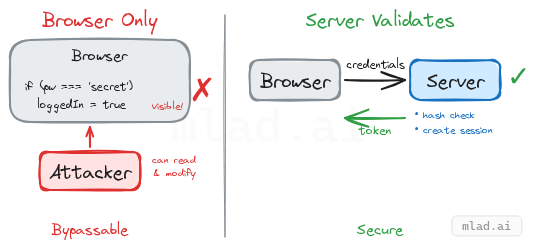
The login check must happen on a machine you control, not in the user's browser.
AI sometimes generates authentication that runs entirely client-side. The password gets embedded in JavaScript, or the app stores a simple loggedIn: true flag that anyone can set from the browser console. The Wiz audit found deployed applications where users could bypass login by opening developer tools and typing a single command.
The fix: use your platform's authentication service rather than AI-generated login flows. These services handle password hashing, session management, and token expiration. If your app has a custom login flow that the AI generated, treat it with suspicion until verified.
2. Secrets stay out of your code
API keys, database passwords, and service credentials must never appear in your source files.
Code that runs in a browser is visible to anyone who visits your site. Developer tools expose every line. If your OpenAI key or Stripe secret is in that code, it is no longer secret. The same applies to code pushed to a repository, even private ones that might become public later.
Every platform provides a secrets manager or environment variable system. Use it instead of pasting credentials into code. If you have already committed secrets to your repository, they remain in the git history even after deletion. Rotate those credentials.
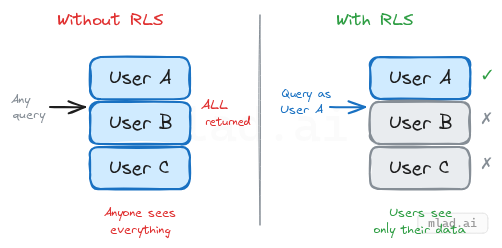
3. Users can only access their own data
Without explicit access controls, a database query can return every user's information to anyone who asks. AI-generated code routinely creates tables without restrictions. The Wiz audit documented a deployed application that leaked all users' personal information because no access policies were configured.
The implementation depends on your stack. Managed databases like Supabase offer Row-Level Security policies. Firebase has Security Rules. Traditional databases with API endpoints need middleware that checks permissions before returning data. The common thread: access control requires deliberate configuration. It does not happen automatically.
4. User content is escaped before display
When your app displays content that users submitted, that content must be treated as text, not as executable code.
If a user submits a comment containing a script tag and your app renders it as HTML, that script runs in every visitor's browser. This is cross-site scripting (XSS). It can steal sessions, redirect users, or modify what the page displays.
Modern frameworks escape content by default. The risk appears when AI uses explicit overrides: dangerouslySetInnerHTML in React, v-html in Vue, innerHTML in vanilla JS. Search your codebase for these patterns. If user-submitted content flows through them unsanitized, you have a vulnerability.
5. Inputs are validated
Everything users submit should be checked for size, type, and format.
An endpoint that accepts file uploads without size limits becomes a way to crash your server. A form field expecting a number that receives a script can cause unexpected behavior. AI-generated code skips these checks because the training data focused on the happy path.
Confirm that email fields contain something shaped like an email. Cap file uploads at a reasonable size. Ensure numeric fields reject non-numeric input. Most frameworks provide validation libraries. The issue is not availability but whether they are actually wired in.
How to Find Issues
Ask the AI to review its own work
The same model that generated your code can help find problems in it. AI has been trained on security audits and vulnerability reports alongside functional code.
Prompt specifically: "Check this login flow for authentication bypasses, weak session handling, and missing rate limiting." Generic requests like "review for security" produce generic results.
This is not foolproof. AI can miss problems or flag false positives. But it costs nothing and catches real issues.
Run automated scanners
For JavaScript projects, npm audit checks dependencies for known vulnerabilities. Snyk and Dependabot provide continuous monitoring and alerts.
For source code analysis, Semgrep scans for dangerous patterns and has free tiers for individuals and open source. Your platform may offer built-in scanning as well.
Search your codebase manually
A few targeted searches take minutes:
localStorage/sessionStorage— if authentication state is stored here, verify that real authentication happens server-side.dangerouslySetInnerHTML/innerHTML/v-html— any match deserves review to confirm user content is not flowing through unsanitized.- Strings resembling API keys — anything starting with
sk-,pk-, or variables namedkey,secret,token. - Git history — run
git log --all --full-history -- "*.env"to check if environment files were ever committed. If secrets touched your repository history, assume they are compromised and rotate them.
Platform Security Resources
The five checks above are universal. The implementation details depend on your stack. Each major platform publishes security documentation:
- Replit — Security guide: Built-in auth, secrets manager, automatic HTTPS.
- v0 / Vercel — Security guide: Secret scanning before deployment, sandboxed execution, environment variables. SOC 2 Type 2.
- Lovable — Security guide: Automatic security scanning, Supabase Auth + Row-Level Security integration.
- Bolt.new — Security guide: Secrets storage, Edge Functions for server-side API calls.
- Cursor — Security guide: Privacy Mode,
.cursorignorefor sensitive files. SOC 2.
Universal resources that apply regardless of platform:
- OWASP Cheat Sheet Series — detailed guidance on authentication, session management, input validation.
- Cloud Security Alliance: Secure Vibe Coding Guide — risks specific to AI-generated applications.
- Aikido: Vibe Coder's Security Checklist — practical checklist for vibe-coded projects.
Explore Security Prompts
Our prompt collection includes system prompts and task templates focused on security review:
- Code Analysis with Security Review — structured checklist for vulnerability scanning, auth review, and input validation
- All Security-Tagged Prompts — filter the collection by security concern