Simple Skill, Full API: Replacing an MCP with 218 Lines
An MCP server silently dropped 9 Ghost API fields. We replaced it with a 218-line Claude Code skill that passes calls straight through the client library.

Greg Ruthenbeck
Table of Contents
We updated a post's meta description through our Ghost CMS integration. The call returned success, but when we read the post back, the field was empty. No error, no warning.
The integration was a community MCP server for Ghost. It had worked fine for months. We used it for creating posts, updating content, and managing tags. The problem only appeared when we started automating SEO metadata. Nine fields, including Open Graph titles, Twitter cards, and custom excerpts. All accepted without error. None persisted.
What Went Wrong
The MCP server used Zod schemas to define which fields each tool accepted. For post edits, the schema whitelisted five fields: title, html, lexical, status, and updated_at. The Ghost Admin API supports over 30 fields on the same endpoint. Every field not in the whitelist was stripped from the request before it reached Ghost.
The underlying client library, @tryghost/admin-api maintained by the Ghost team, sends whatever you give it without filtering. The MCP added a validation layer on top of that client, and that layer was the bottleneck.
This is not a criticism of the MCP author. Whitelisting fields is a reasonable safety measure. But when the whitelist is incomplete and the validation is silent, you get a tool that appears to work while quietly discarding your data.
The MCP Trade-off
MCP servers are convenient. Find one for your API, install it, and your AI tool gets structured access to that service. Each integration adds a layer between the model and the API. For quick setups, that layer is worth the convenience.
The trade-off becomes clear when a complete, well-maintained client library already exists for your API. The MCP wraps that library and adds a schema layer on top. That layer has to be maintained separately from the library itself. In our case, @tryghost/admin-api already handled every field Ghost supports. The MCP added restrictions that the client library did not have.
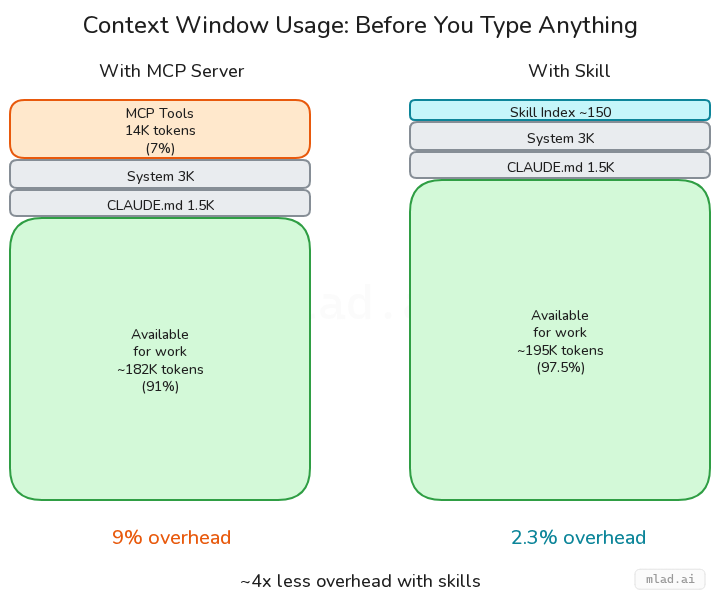
There is also a token cost. MCP tool schemas are sent with every request to the model. For an API you use frequently, that overhead adds up.
The Alternative: a Thin Executor
Instead of patching the MCP, we asked what we could remove. The Ghost client library already handled every field and every endpoint. We wrapped it in a thin executor and gave Claude direct access. The whole thing is 218 lines across two files.
The pattern is simple. A run.js script loads the client library, configures it with credentials from a config file, and exposes the full API surface as globals: posts, pages, tags, images, members, and a dozen others. When Claude needs to interact with Ghost, it writes a JavaScript snippet and run.js evaluates it. No schema definition, no field whitelist. Whatever the client library accepts, the skill accepts.
A SKILL.md file tells Claude what globals are available and shows common usage patterns. Claude reads this once when the skill is invoked, then writes against the API directly. The skill is installed as a symlink into Claude's skills directory.
This means Claude composes real API calls using the same client library a developer would use. When we ask it to update a post's SEO metadata, it writes the same three lines you would write by hand: read the post, set the fields, call edit. When we ask it to audit all posts for missing Open Graph tags, it writes a browse call, filters the results, and prints a report. The code is visible, editable, and runs in the same process as the conversation.
The same pattern works for any API that has an official client library. We use an identical structure for Reddit. The executor stays the same. Only the client and globals change.
What You Gain
The immediate win was that SEO fields worked. We wrote an og_title, read the post back, and the value was there.
Beyond that, the skill stays current with the API automatically. When Ghost adds a new post field, it works because the client library passes it through. Nobody needs to update a schema or wait for a release.
Token usage dropped too. The MCP sent its full tool schema on every request to the model. The skill sends nothing until invoked, and when it runs, the payload is a short JavaScript snippet.
We also got something we did not plan for. Because the skill runs code inline, Claude can reference the conversation when composing API calls. "Update the SEO for this post based on what we just wrote" works naturally. Claude reads the SKILL.md for patterns, uses the conversation for context, and writes a snippet that does exactly what you asked.
When to Use Which
MCPs are a good starting point. If a well-maintained MCP server exists for your API and covers the fields you need, there is no reason to replace it. The setup cost is low and the protocol handles the plumbing.
The executor pattern earns its keep when you need full API access, when you are hitting limits in someone else's schema, or when a solid client library already exists. Building one took us an afternoon. Maintaining it takes almost nothing because the client library does the heavy lifting.
If you find yourself writing workarounds for an MCP, pause and look at what is underneath it. There is often a well-maintained client library doing the real work. The fix may be to strip away the layer above it and let Claude use that library directly.
Build Your Own
Five files. One dependency. Here is the structure we use for both Ghost and Reddit.
your-skill/
├── SKILL.md          # Skill definition + usage patterns
├── run.js            # Executor: load client, expose globals, eval code
├── lib/client.js     # Client init + config resolution
├── package.json      # Single dep: the official client library
└── examples/         # Runnable scripts for common tasks
SKILL.md is the entry point. The frontmatter registers the skill name and declares which tools it can use. The body documents available globals and shows common patterns with short examples. Claude reads this once per invocation.
---
name: your-api
description: What this skill does, when to use it.
allowed-tools:
  - Bash(cd ~/your-skill && node run.js *)
---
run.js does three things: loads the client library, creates a globals object with every API resource, and evaluates user code in an async context. It accepts a file path, an inline string, or stdin. The core is about 60 lines. The rest is input handling and error formatting.
lib/client.js resolves credentials. Environment variables take priority. A JSON config file at ~/.config/your-skill.json is the fallback. Export a getClient() singleton for normal use and a createClient(url, key) factory for multi-instance setups.
package.json has one dependency: the official client library for your API. Nothing else.
Install by symlinking your project into Claude's skills directory. The skill lives in its own repo with proper version control, and the symlink means changes you make are picked up immediately without copying files back and forth into Claude's system folders:
ln -s ~/your-skill ~/.claude/skills/your-apiThe executor pattern is the same regardless of which API you wrap. Swap the client library, change the globals, update the SKILL.md examples. Everything else carries over.
References
Claude Code documentation for the three extension mechanisms discussed in this article:
- Skills -- custom slash commands and skill definitions. How to create SKILL.md files, register them, and control invocation.
- MCP Servers -- connecting Claude Code to external tools via the Model Context Protocol. Configuration, transport options, and usage patterns.
- Hooks -- user-defined shell commands that run at specific points in Claude Code's lifecycle. Event types, matchers, and configuration.
The Model Context Protocol itself is documented at modelcontextprotocol.io, with the full specification at spec.modelcontextprotocol.io.