#filetransfer #hacking [source](https://academy.hackthebox.com/module/24/section/159) There are many situations when transferring files to or from a target system is necessary. Let's imagine the foll
#filetransfer #hacking [source](https://academy.hackthebox.com/module/24/section/159) There are many situations when transferring files to or from a target system is necessary. Let's imagine the following scenario: **Setting the Stage** During an engagement, we gain remote code execution (RCE) on an IIS web server via an unrestricted file upload vulnerability. We upload a web shell initially and then send ourselves a reverse shell to enumerate the system further in an attempt to escalate privileges. We attempt to use PowerShell to transfer [PowerUp.ps1](https://github.com/PowerShellMafia/PowerSploit/blob/master/Privesc/PowerUp.ps1) (a PowerShell script to enumerate privilege escalation vectors), but PowerShell is blocked by the [Application Control Policy](https://docs.microsoft.com/en-us/windows/security/threat-protection/windows-defender-application-control/windows-defender-application-control). We perform our local enumeration manually and find that we have [SeImpersonatePrivilege](https://docs.microsoft.com/en-us/troubleshoot/windows-server/windows-security/seimpersonateprivilege-secreateglobalprivilege). We need to transfer a binary to our target machine to escalate privileges using the [PrintSpoofer](https://github.com/itm4n/PrintSpoofer) tool. We then try to use [Certutil](https://docs.microsoft.com/en-us/windows-server/administration/windows-commands/certutil) to download the file we compiled ourselves directly from our own GitHub, but the organization has strong web content filtering in place. We cannot access websites such as GitHub, Dropbox, Google Drive, etc., that can be used to transfer files. Next, we set up an FTP Server and tried to use the Windows FTP client to transfer files, but the network firewall blocked outbound traffic for port 21 (TCP). We tried to use the [Impacket smbserver](https://github.com/SecureAuthCorp/impacket/blob/master/examples/smbserver.py) tool to create a folder, and we found that outgoing traffic to TCP port 445 (SMB) was allowed. We used this file transfer method to successfully copy the binary onto our target machine and accomplish our goal of escalating privileges to an administrator-level user. Understanding different ways to perform file transfers and how networks operate can help us accomplish our goals during an assessment. We must be aware of host controls that may prevent our actions, like application whitelisting or AV/EDR blocking specific applications or activities. File transfers are also affected by network devices such as Firewalls, IDS, or IPS which can monitor or block particular ports or uncommon operations. File transfer is a core feature of any operating system, and many tools exist to achieve this. However, many of these tools may be blocked or monitored by diligent administrators, and it is worth reviewing a range of techniques that may be possible in a given environment. This module covers techniques that leverage tools and applications commonly available on Windows and Linux systems. The list of techniques is not exhaustive. The information within this module can also be used as a reference guide when working through other HTB Academy modules, as many of the in-module exercises will require us to transfer files to/from a target host or to/from the provided Pwnbox. Target Windows and Linux machines are provided to complete a few hands-on exercises as part of the module. It is worth utilizing these targets to experiment with as many of the techniques demonstrated in the module sections as possible. Observe the nuances between the different transfer methods and note down situations where they would be helpful. Once you have completed this module, try out the various techniques in other HTB Academy modules and boxes and labs on the HTB main platform.#windows #filetransfer #hacking #powershell [source](https://academy.hackthebox.com/module/24/section/160) ## Introduction The Windows operating system has evolved over the past few years, and new versions come with different utilities for file transfer operations. Understanding file transfer in Windows can help both attackers and defenders. Attackers can use various file transfer methods to operate and avoid being caught. Defenders can learn how these methods work to monitor and create the corresponding policies to avoid being compromised. Let's use the [Microsoft Astaroth Attack](https://www.microsoft.com/security/blog/2019/07/08/dismantling-a-fileless-campaign-microsoft-defender-atp-next-gen-protection-exposes-astaroth-attack/) blog post as an example of an advanced persistent threat (APT). The blog post starts out talking about [fileless threats](https://docs.microsoft.com/en-us/microsoft-365/security/intelligence/fileless-threats?view=o365-worldwide). The term `fileless` suggests that a threat doesn't come in a file, they use legitimate tools built into a system to execute an attack. This doesn't mean that there's not a file transfer operation. As discussed later in this section, the file is not "present" on the system but runs in memory. The `Astaroth attack` generally followed these steps: A malicious link in a spear-phishing email led to an LNK file. When double-clicked, the LNK file caused the execution of the [WMIC tool](https://docs.microsoft.com/en-us/windows/win32/wmisdk/wmic) with the "/Format" parameter, which allowed the download and execution of malicious JavaScript code. The JavaScript code, in turn, downloads payloads by abusing the [Bitsadmin tool](https://docs.microsoft.com/en-us/windows/win32/bits/bitsadmin-tool). All the payloads were base64-encoded and decoded using the Certutil tool resulting in a few DLL files. The [regsvr32](https://docs.microsoft.com/en-us/windows-server/administration/windows-commands/regsvr32) tool was then used to load one of the decoded DLLs, which decrypted and loaded other files until the final payload, Astaroth, was injected into the `Userinit` process. Below is a graphical depiction of the attack. 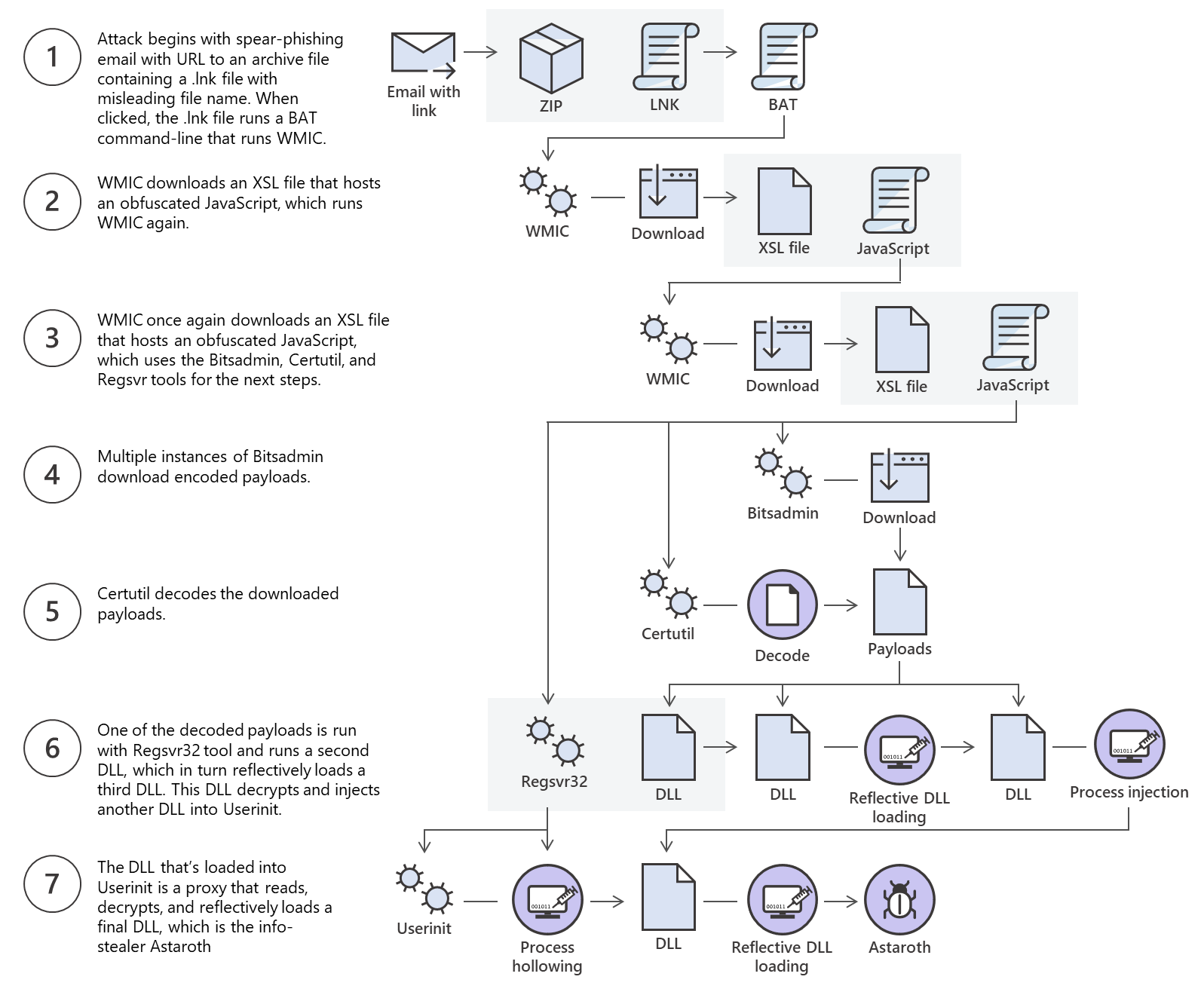
Sign in to view the full prompt.
Sign In