← Prompts
Reference Copilot Instructions Collection
Define and handle custom events in PCF components
Define and handle custom events in PCF components
# Define Events (Preview) [This topic is pre-release documentation and is subject to change.] A common requirement when building custom components with the Power Apps Component Framework is the ability to react to events generated within the control. These events can be invoked either due to user interaction or programmatically via code. For example, an application can have a code component that lets a user build a product bundle. This component can also raise an event which could show product information in another area of the application. ## Component Data Flow The common data flow for a code component is data flowing from the hosting application into the control as inputs and updated data flowing out of the control to the hosting form or page. This diagram shows the standard pattern of data flow for a typical PCF component: 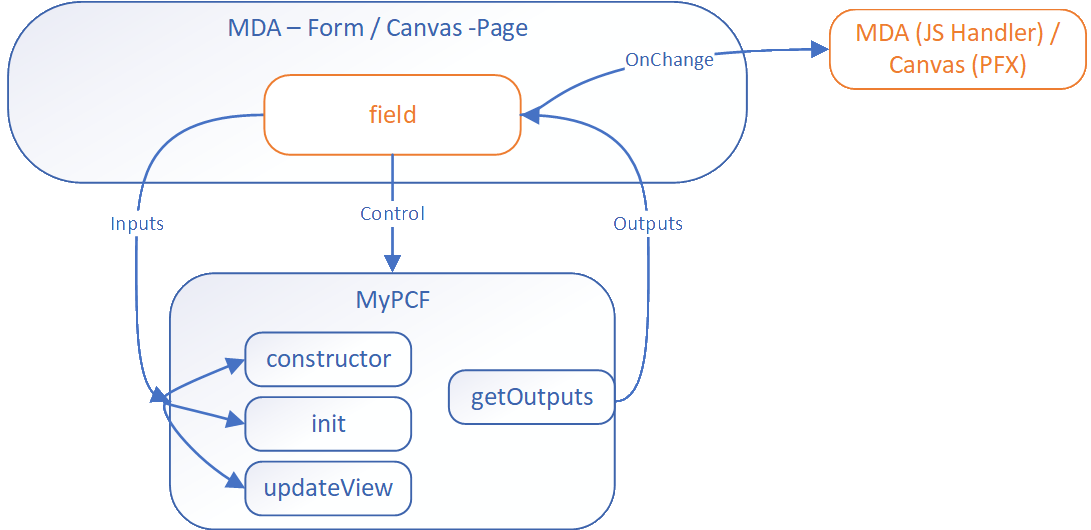 The data update from the code component to the bound field triggers the `OnChange` event. For most component scenarios, this is enough and makers just add a handler to trigger subsequent actions. However, a more complicated control might require events to be raised that aren't field updates. The event mechanism allows code components to define events that have separate event handlers. ## Using Events The event mechanism in PCF is based on the standard event model in JavaScript. The component can define events in the manifest file and raise these events in the code. The hosting application can listen to these events and react to them. ### Define Events in Manifest The component defines events using the [event element](https://learn.microsoft.com/en-us/power-apps/developer/component-framework/manifest-schema-reference/event) in the manifest file. This data allows the respective hosting application to react to events in different ways. ```xml <property name="sampleProperty"
Sign in to view the full prompt.
Sign InClassification
Reference Documentation, cheatsheets, setup guides
Scope Project
This codebase Manual Manually placed / Persistent