← Prompts
Reference Copilot Instructions Collection
Code components for canvas apps implementation, security, and configuration
Code components for canvas apps implementation, security, and configuration
# Code Components for Canvas Apps Professional developers can use Power Apps component framework to create code components that can be used in their canvas apps. App makers can use Power Apps component framework to create, import, and add code components to canvas apps using [Microsoft Power Platform CLI](https://learn.microsoft.com/en-us/power-apps/developer/component-framework/get-powerapps-cli). > **Note**: Certain APIs might not be available in canvas apps. We recommend that you check each API to determine where it's available. ## Security Considerations > **Warning**: Code components contain code that may not be generated by Microsoft and can potentially access security tokens and data when rendered in Power Apps Studio. When adding code components to a canvas app, make sure that the code component solutions are from a trusted source. This vulnerability does not exist when playing the canvas app. ### Security Warning in Power Apps Studio When you open a canvas app that contains code components in Power Apps Studio, a warning message about potentially unsafe code appears. Code components in the Power Apps Studio environment have access to security tokens; hence only components from trusted sources should be opened. **Best Practices:** - Administrators and system customizers should review and validate all code components before importing them into an environment - Make components available to makers only after validation - The `Default` publisher is shown when you import code components by using an unmanaged solution or when you have used `pac pcf push` to install your code component 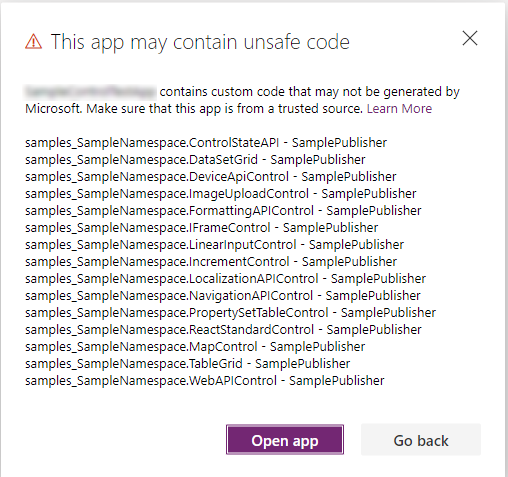 ## Prerequisites - A Power Apps license is required. More information: [Power Apps component framework licensing](https://learn.microsoft.com/en-us/power-apps/developer/component-framework/overview#licensing) - System administrator privileges are required to enable the Power Apps component framework feature in the environment
Sign in to view the full prompt.
Sign InClassification
Reference Documentation, cheatsheets, setup guides
Scope Project
This codebase Manual Manually placed / Persistent